
🛸 FREE: Basic Pathfinding Module for Flying AI (Open Source) | Roblox Flying AI Pathfinding
- Primal Cam
- Aug 10, 2025
- 2 min read

Flying NPCs (drones, birds, spirits) don’t fit Roblox’s ground‑focused PathfindingService. This guide ships a complete, open‑source ModuleScript for lightweight 3D navigation using raycast steering + goal seeking, plus an example NPC setup you can paste directly into Studio.
No dependencies. Works with Parts, MeshParts, and Model primaries. Server‑authoritative by default.
What you’ll build | Roblox Flying AI Pathfinding
A reusable FlyPath module that:
Moves an agent through 3D space toward a target Vector3 or BasePart.
Avoids obstacles using multi‑probe raycasts (ahead, sides, up/down).
Smooths turns with acceleration/turn limits.
Supports follow, seek, patrol, and arrive behaviors.
Exposes events: Reached, Blocked, Stalled.
A drop‑in NPC Controller script that uses the module.
Folder structure
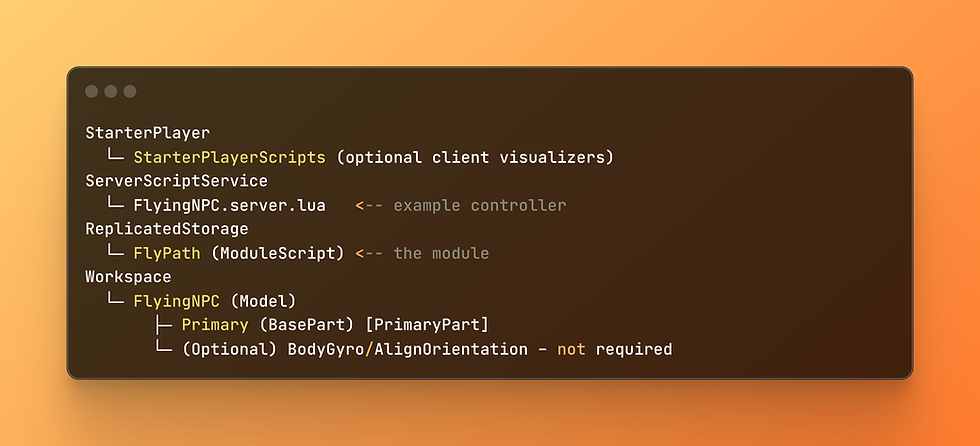
Tip: Set your FlyingNPC model’s PrimaryPart to a central part named Primary (massless, CanCollide=false). The module moves this part only.
The Module (FULL – paste into ReplicatedStorage/FlyPath)

Example NPC Controller (FULL – paste into ServerScriptService/FlyingNPC.server.lua)

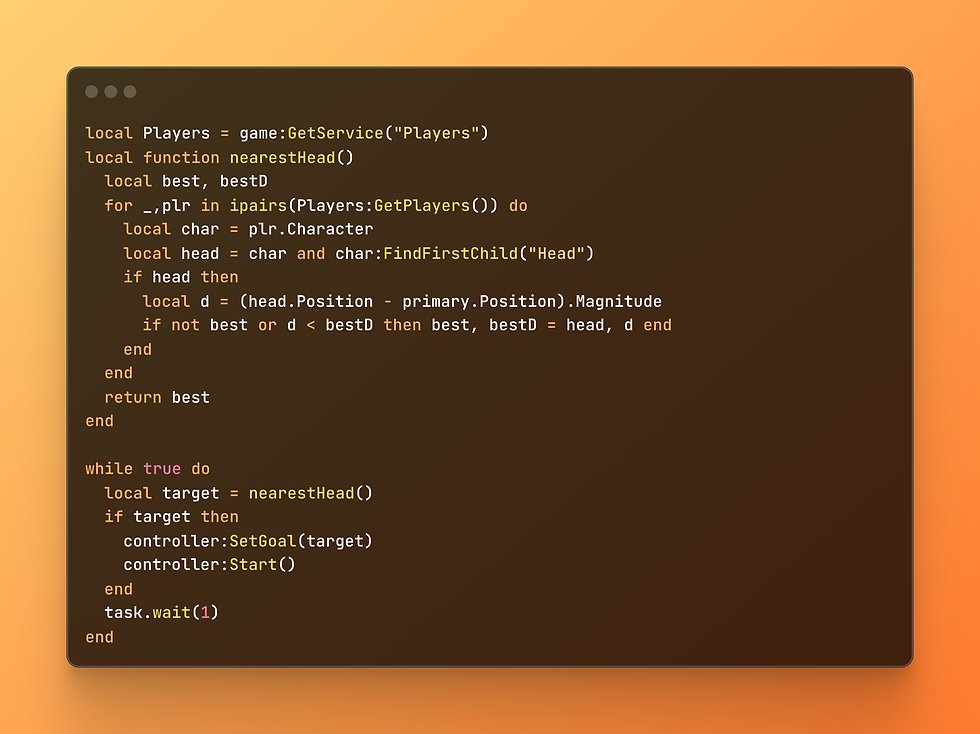
Follow/Seek a Player (snippet)
To make the NPC chase the nearest player’s head:
Debugging & Tuning
Overshooting target → increase ArrivalRadius, StopRadius, or reduce MaxSpeed.
Wobbly flight → lower HoverDrift, raise TurnRate a bit to smooth yaw/pitch.
Stuck on walls → increase ProbeDistance and ProbeRadius (gives probes more clearance).
Through thin parts → add more detours in _steer or probe diagonals.
Perf tips: Keep RepathInterval ≥ 0.1s. Avoid hundreds of flyers on one server; batch updates if needed.
Optional: Client Visualizer (draw direction)

Notes & Limitations
This is local steering, not navmesh. It won’t plan long, winding routes around complex mazes; instead, it continuously avoids what’s in front.
For large caves or multi‑room interiors, place intermediate waypoints (like patrol nodes) and let the module steer between them.
If you need strict room‑to‑room routes, combine this with a graph/waypoint network and feed waypoints as goals.
License
MIT – use it, ship it, modify it. If you improve it, consider sharing back a PR or snippet so others benefit.
Next steps
Add attack runs: dip to a height above the player then climb.
Add formation flight: multiple agents offset from a leader’s goal.
Swap the movement line part.CFrame = ... for VectorForce + AlignOrientation if you prefer physics‑based thrust.
Happy flying! 🛸 (Roblox Flying AI Pathfinding)

$50
Product Title
Product Details goes here with the simple product description and more information can be seen by clicking the see more button. Product Details goes here with the simple product description and more information can be seen by clicking the see more button

$50
Product Title
Product Details goes here with the simple product description and more information can be seen by clicking the see more button. Product Details goes here with the simple product description and more information can be seen by clicking the see more button.
$50
Product Title
Product Details goes here with the simple product description and more information can be seen by clicking the see more button. Product Details goes here with the simple product description and more information can be seen by clicking the see more button.


Hi Guys